

Error codes
Error: Wrong Token Received
This error code occurs after you purchase a lifetime/full license of the MT4 True RSI and are trying to get it to work. You’re getting this error because our authentication system uses google time and your computer has a manual time set.
To solve this, simply do this:
Right-click on your date/time at the bottom right of your screen and click “Adjust date/time”. Once you’re done with that, you can check the box “Set Time Automatically” and you’re done! You can reload the MT4 Trade Manager and everything should load perfectly.
Error 4112
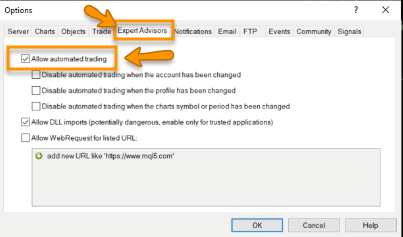
This error occurs because your broker does not allow EAs on your account. Either that, or you have disabled live trading on your MT4. First, try to solve it by doing going to your EA settings and checking these boxes (see picture).
If the problem still persists after this, there’s a high chance the broker does not allow EAs to work on this and you ought to change broker (as seriously, which broker does that these days?)
Error 4109
This error occurs because “Trade Is Not Allowed”. This is basically MT4 telling the Expert Advisor that it is not allowed to trade. There are 2 things you need to do to solve this.
Go to tools > Options and select the “Expert Advisors” tab.
1. Ensure “Allow automated trading” is checked. (Don't worry, this won't automatically trade for you, it's just one of the bad ways MT4 is set up).
2. When you drag the MT4 Trade Manager onto your chart, go to “Common” and ensure “Allow live trading” is checked.
